Text Formatting
Like vanilla Markdown, you can apply basic text formatting using a variety of delimiters. TeXSmith extends this with small capitals support.
The quick brown fox jumps over the lazy dog. *(regular)*

*The quick brown fox jumps over the lazy dog.* *(italic)*

**The quick brown fox jumps over the lazy dog.** *(bold)*

***The quick brown fox jumps over the lazy dog.*** *(bold italic)*

~~The quick brown fox jumps over the lazy dog.~~ *(strikethrough)*

__The quick brown fox jumps over the lazy dog.__ *(small capitals)*
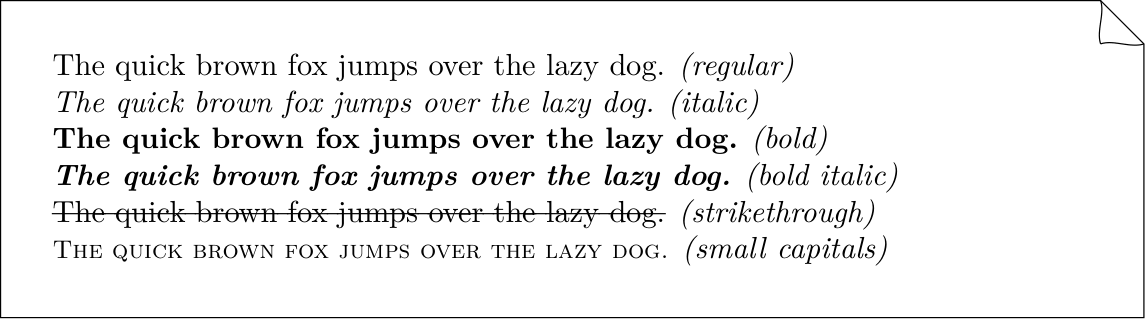
The pymdownx.betterem extension lets you stack delimiters for bold italic.
Standalone bold paragraphs (\tslead)
A paragraph whose only content is a short bold span (under 80 characters) is promoted to a lead-in pseudo-heading rather than rendered as a plain \textbf{…}. TeXSmith emits \tslead{…}, defined as:
\providecommand{\tslead}[1]{\par\noindent\textbf{#1}\par\nobreak\smallskip}
This guarantees a no-indent paragraph break and a small vertical breather, so the label looks identical regardless of what precedes it. Without this, **Méthodologie** wedged between two tables (\end{center} ... \textbf{…} ... \begin{center}) would render flush left while the same construct after running prose would be indented by babel-french's \parindent. With \tslead, both cases align.
La synthèse récapitule, pilier par pilier, les forces et faiblesses…

**Sens critique**

| Python | C |
|--------|---|
| Faible | Fort |

**Méthodologie**

| Python | C |
|--------|---|
| Correcte | Forte |
The rule fires when the <p> contains exactly one <strong> child and nothing else (whitespace aside), and the bold's plain-text content is shorter than 80 characters. Bold spans inside running prose (Some **bold** text.), bold paragraphs over the threshold, and bold labels synthesised by other extensions (e.g. tabbed-set labels, which sit inside a <div>) keep their original \textbf{…} rendering.
Override \tslead in a custom preamble snippet to change the visual style — for instance, to add a coloured rule, switch to small caps, or replace the \smallskip with \medskip:
\renewcommand{\tslead}[1]{\par\noindent\textsc{#1}\par\nobreak\medskip}
Note
In MkDocs, you need to specify how to render small capitals using a custom CSS:
.texsmith-smallcaps {
    font-variant: small-caps;
    letter-spacing: 0.04em;
}
Then, include this CSS in your MkDocs configuration under extra_css:
extra_css:
  - stylesheets/smallcaps.css