TMark
If Markdown is new to you, start with the canonical guide.
The original spec is spartan—tables, diagrams, and other niceties didn’t exist.
Over time new flavours sprouted to fill the gaps. For printed documentation, especially for scientific or technical reports, more is required still:
- Citations and bibliographies
- Cross-references
- Diagrams (Mermaid, draw.io, Vega)
- Mathematical formulas (LaTeX math)
- Index
- Glossary and acronyms
- Rich tables (spans, multi-line cells, grouped headers)
- Raw passthrough to one backend without polluting the others
TMark (TeXSmith Markdown) is the dialect TeXSmith reads: CommonMark, plus the extension set every MkDocs site already loads, plus exactly four syntactic families for everything print needs. It has a specification, a parser, a printer and a linter, and one canonical spelling per construct.
Markdown is a mess
So many flavours, so many extensions, so many incompatible syntaxes—it’s a jungle. CommonMark tried to herd the cats and mostly succeeded, but fragmentation remains. MyST brought Sphinx-style goodies to Markdown, yet it isn’t MkDocs-compatible, so TeXSmith had to chart its own course.
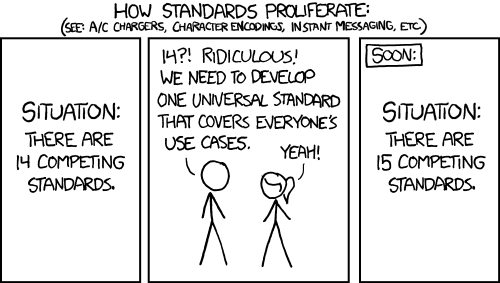
Source: xkcd1.
TMark's answer is not another pile of extensions: it is a closed set of rules, so that a construct you have never seen can still be read.
Four syntactic families
Beyond core CommonMark (headings, paragraphs, lists, quotes, emphasis, links, images, fenced code), TMark adds exactly four families. Every construct on the following pages is an instance of one of them.
Attributes decorate the element before them.
## Boot sequence {#sec:boot}
{width=60%}
A brace group holds #id, .class and key=value items, separated by spaces;
values with spaces are double-quoted. There are no bare-word attributes: write
{collapsed=true}, not {collapsed}. Attributes need a host; where you want
them on a piece of running text, wrap it in a span: [this claim]{#claim:one}.
Roles create semantic inline nodes; the name comes before the content.
{index}[endianness] {aside}[see Prandtl 1921] {raw latex}(\clearpage)

{include}(chapter.md)
Brackets and parentheses follow the rule Markdown links already apply in
[content](argument): brackets hold content, parsed as Markdown and read by
the reader; parentheses hold a verbatim argument the processor consumes.
{aside}[see **Prandtl**] is content; {raw latex}(\textbf{x}) and
{include}(chapter.md) are arguments, and nothing inside them is ever
Markdown.
Container directives hold Markdown.
::: figure {cols=2}


Figure: Watchdog traces. {#fig:traces}
:::
Nesting is by fence length (:::: outside :::), as in Pandoc. The container
names TMark knows are a closed registry — the callout types, aside,
figure, tabs, tab, multicolumn {cols=}, landscape and div — so an unknown name
raises container-unknown and renders its content transparently, and a
template that needs a new look uses div {.class} rather than a new name.
A dotted pkg.module line is not a container at all but a foreign
directive, kept verbatim and dropped in print.
Data directives hold non-Markdown content in a fenced code block whose info
string is <lang> <node>. The second word names the node the fence produces and
defaults to code, so an ordinary code block is the degenerate case.
```python image
import matplotlib.pyplot as plt
plt.plot([1, 2, 4, 8])
plt.savefig("out.pdf")
```

```yaml table
columns: [A, B]
rows: [[1, 2]]
```
The node words are code, table, table-config, image and raw.
Two sigils
TMark reserves two inline sigils, each with one meaning.
| Sigil | Meaning | In braces (attribute) | Before brackets (node) |
|---|---|---|---|
# |
define | {#id} names an existing host element |
#[term] an index entry (content), #(fw:key) a counter item (argument) |
@ |
refer | (none) | @key bare, @[key …] bracketed |
# defines, @ refers is the mnemonic the whole reference system hangs on.
@ resolves against named registries: a declared counter prefix, gls: for the
glossary, doi: for a DOI, and otherwise the bibliography. Both sigils are
guarded — @ never fires inside a word, an e-mail address or a URL, and #[
or #( followed by a non-space does not occur in prose — and both escape with
a backslash: \@, \#.
Degradation classes
Every construct says what a renderer other than TeXSmith shows for the same bytes.
- C, compatible
- Renders identically in CommonMark and GFM.
- E, extension-compatible
- Not CommonMark, but identical under the standard extension set every MkDocs and Python-Markdown site already loads.
- D, degrades
- Foreign renderers show something readable but unstyled: a code block, a
literal
!!! noteline, aTable:paragraph. - X, diverges
- The same bytes mean something else in GFM. There are five, and they are listed below.
| # | Syntax | GFM meaning | TMark meaning |
|---|---|---|---|
| X1 | __text__ |
bold | small caps |
| X2 | --- |
horizontal rule | divider; a page break in paged media |
| X3 | ~x~ |
strikethrough | subscript |
| X4 | @word |
literal | reference or citation |
| X5 | #[…], #(…) |
literal | index entry, counter item |
X1 and X2 are disabled by the strict profile, for teams that co-render their
sources on GitHub.
Compatibility
CommonMark
CommonMark is the standardized, modern version of Markdown, and TMark's substrate.
| Feature | Syntax | Supported |
|---|---|---|
| Italic | *x* |
Yes |
| Bold | **x** |
Yes |
| Heading | # H |
Yes |
| Links | [Text](url) |
Yes |
| Images |  |
Yes |
| Inline Code | `code` |
Yes |
| Footnotes | [^1] |
Yes |
| Tables | pipe tables | Yes |
| Blockquotes | > Quote |
Yes |
| Ordered Lists | 1. Item |
Yes |
| Unordered Lists | - Item |
Yes |
| Dividers | --- |
Yes (X2) |
| Superscript | ^x^ |
Yes |
| Subscript | ~x~ |
Yes (X3) |
| Strikethrough | ~~x~~ |
Yes |
The standard extension set
These are the extensions that define class E: they are what MkDocs, MkDocs Material and Zensical already load, and TMark never redefines what they do.
| Package | Extensions | Constructs |
|---|---|---|
| Python-Markdown | extra (abbr, attr_list, def_list, fenced_code, footnotes, md_in_html, tables), admonition, toc |
acronyms, attributes, definition lists, footnotes, pipe tables, !!! callouts, <div markdown>, [TOC] |
| PyMdownX | superfences, highlight, inlinehilite, snippets, arithmatex |
nested fences, code options, #!lang inline code, includes, math |
| PyMdownX | caret, tilde, mark, keys, betterem, smartsymbols, emoji, magiclink, critic |
^x^, ~x~, ==x==, ++ctrl+s++, smart symbols, emoji, bare URLs, critic markup |
| PyMdownX | details, tasklist, fancylists, progressbar, tabbed |
??? callouts, task items, list markers, progress bars, tabs |
What TMark adds
| Feature | Canonical spelling | Page |
|---|---|---|
| Headings, implicit ids | ## Title {#sec:x}, {.unnumbered} |
Headings |
| Small caps | {sc}[x] (sugar __x__) |
Formatting |
| Smart symbols and quotes | (c), -->, "a phrase" |
Symbols |
| Emoji and icons | :smile:, :material-cog: |
Emoji |
| Margin notes / asides | {aside}[…], aside |
Notes |
| Index entries | {index}[term], #[term] |
Tags |
| Counter items | #(fw:key), {counter}(fw:key) |
Counters |
| References and citations | @key, @[key, p. 3] |
References |
| Glossary references | @gls:term |
Notes |
| Caption lines | Figure: … {#fig:x} |
Captions |
| Structured tables | ```yaml table |
Tables |
| Raw passthrough | {raw latex}(…), ```latex raw |
below |
| Includes | {include}(file.md) |
below |
| Progress bars | [=75% "Done"] |
Progress bars |
| Containers | name {attrs} |
Admonitions |
| Content tabs | tabs + tab {title=…} |
Admonitions |
| Foreign directives | [TOC], pkg.module |
Admonitions |
Raw passthrough
Escape hatches are explicit, backend-tagged and invisible to other backends.
They are all spelled with the one word raw.
Block form — a data directive whose node word is raw:
```latex raw
\newcommand{\R}{\mathbb{R}}
```
Inline form — a role whose payload is an argument, hence the parentheses:
Section break {raw latex}(\clearpage) before the next topic.
typst raw / {raw typst}(…) and html raw / {raw html}(…) work the same
way. A latex raw fence is ignored by the Typst and HTML backends, and vice
versa, which is precisely how one document targets three outputs.
The 0.6 spellings are deprecated
/// latex … /// and {latex}[…] are still parsed with a deprecation
warning. tmark lint --fix rewrites both; see
Migrating to TMark.
Includes
A block include is the include role alone on its line; the path is an
argument.
{include}(chapters/boot.md)

{include base=chapters}(boot.md)
The included file is parsed as TMark and its blocks are spliced into the
document, so a fenced block inside it is content and cannot close anything in
the including file. Relative paths inside it resolve against its own directory;
base= overrides. Fenced code takes include="file" on its info string
instead of inlining content.
--8<-- \"file\" is deprecated
The PyMdownX snippet syntax is accepted as sugar. It pastes text before
parsing, which breaks on nested fences, and it never rebases paths.
tmark lint --fix rewrites it to {include}(file).
Features
Every switchable behaviour has a dotted name and a default; press.features in
the front matter flips entries, and nothing else does.
| Feature | Default | Effect |
|---|---|---|
paragraph.lead |
on | promote a leading short strong span to {lead}[…] |
table.decimal-align |
on | align numeric right-aligned columns on the decimal point |
tasklist.partial |
off | - [.] partial task items |
figures.exec |
off | execute python image fences |
glossary.wikipedia |
off | fetch glossary summaries from Wikipedia links |
inline.insert |
off | ^^x^^ as {underline}[x] |