Text Formatting
Like vanilla Markdown, you can apply basic text formatting using a variety of delimiters. Every inline node has a role as its canonical spelling, and most have a familiar shorthand as sugar; both produce the same node.
| Node | Canonical | Sugar | LaTeX |
|---|---|---|---|
| Emphasis | *x* |
_x_ |
\emph |
| Strong | **x** |
(none) | \textbf |
| Small caps | {sc}[x] |
__x__ (X1) |
\textsc |
| Strikeout | {del}[x] |
~~x~~ |
\sout |
| Underline | {underline}[x] |
^^x^^, only with inline.insert on |
\uline |
| Highlight | {mark}[x] |
==x== |
\tsmark |
| Subscript | {sub}[x] |
~x~ (X3) |
\textsubscript |
| Superscript | {sup}[x] |
^x^ |
\textsuperscript |
| Keystroke | {keys}[ctrl+s] |
++ctrl+s++ |
\tskeys |
| Code | `x` |
(none) | engine-dependent |
| Highlighted code | {code py}[print(1)] |
`#!py print(1)` |
engine-dependent |
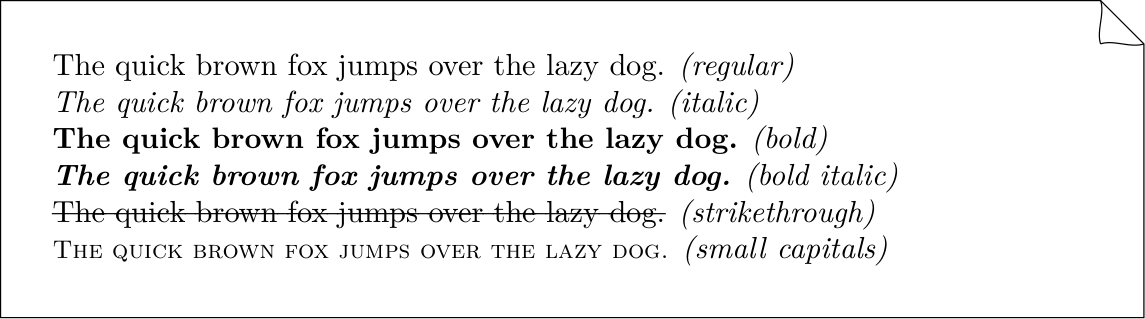
*(regular)* The quick brown fox jumps over the lazy dog.

*(italic)* *The quick brown fox jumps over the lazy dog.*

*(bold)* **The quick brown fox jumps over the lazy dog.**

*(bold italic)* ***The quick brown fox jumps over the lazy dog.***

*(strikethrough)* ~~The quick brown fox jumps over the lazy dog.~~

*(small capitals)* {sc}[The quick brown fox jumps over the lazy dog.]

*(highlight)* {mark}[The quick brown fox] and *(keys)* {keys}[ctrl+s].
__x__ is small caps, not a second bold: that is deviation X1 of the
degradation classes, disabled by the strict
profile. __ duplicates **, and academic writing needs small caps far more
than a second bold — and the difference is visible, not silent.
Delimiters stack for bold italic, and _ never opens emphasis inside a word,
so snake_case_name stays literal.
Underline and ^^x^^
Underline has a role and no default sugar: print typography treats the
underline as a typewriter relic, and the obvious spelling __x__ went to small
caps instead.
^^x^^ — PyMdownX's caret "insert" — is not a TMark construct. With the
feature inline.insert off, which is the default, it is literal text and
raises the hint feature-off. Switched on, it is sugar for {underline}[x]:
one node whatever the spelling, and the printer emits the role.
---
press:
  features:
    inline.insert: true
---

Now {underline}[inserted] text, or ^^inserted^^ in sugar.
Substitutions
Three things are rewritten while a run of text is scanned, all of them producing ordinary text rather than a node:
(c),-->,1/2and their siblings, and a"straight-quoted"phrase, which is why quotes reach the PDF as\enquote{…}in the document's language — see Smart symbols and quotes;:smile:, which expands to the character, while a Material icon shortcode becomes a web-only span that print drops — see Emoji and icons.
LaTeX, XeLaTeX, BibTeX and their siblings, written as plain words, are
set as logos by the writers: there is no node and no role, the words stay
ordinary text, and the rule is the feature typography.tex-logos (on, whole
words only, never inside code, math, raw passthroughs, link destinations or
attribute values).
Lead-in paragraphs ({lead}[…])
A lead-in — a short run-in heading that opens a paragraph — has an explicit role:
{lead}[Boot sequence.] The device powers the flash before the SoC…
A paragraph whose whole content is a strong span shorter than 80 characters
is promoted to a lead-in automatically while the paragraph.lead feature is on
(the default; off under strict). A strong span that merely opens a
paragraph is a bold run-in and stays one — promoting it would move the rest of
the sentence into a paragraph of its own, since \tslead breaks the paragraph
around the lead-in — and a bold-only list item is a label, not a lead-in. The
promotion is sugar, not magic: it is named, switchable, and tmark lint --fix
rewrites it to the role. Either way TeXSmith emits \tslead{…}, defined as:
\providecommand{\tslead}[1]{\par\noindent\textbf{#1}\par\nobreak\smallskip}
This guarantees a no-indent paragraph break and a small vertical breather, so the label looks identical regardless of what precedes it. Without this, **Méthodologie** wedged between two tables (\end{center} ... \textbf{…} ... \begin{center}) would render flush left while the same construct after running prose would be indented by babel-french's \parindent. With \tslead, both cases align.
La synthèse récapitule, pilier par pilier, les forces et faiblesses…

{lead}[Sens critique]

| Python | C |
|--------|---|
| Faible | Fort |

{lead}[Méthodologie]

| Python | C |
|--------|---|
| Correcte | Forte |
Written as **Sens critique** on a line of its own, the same two labels are
promoted to lead-ins automatically and tmark lint says so
(lead-promotion). The rule fires only when the paragraph is that strong
span and nothing else, and its plain text is shorter than 80 characters. Bold
spans inside running prose (Some **bold** text.), a run-in such as
**Leading bold:** followed by text, and bold paragraphs over the threshold
all keep their \textbf{…} rendering. The {lead}[…] role, by contrast, always
takes what follows it on the paragraph, whatever the feature says.
Override \tslead in a custom preamble snippet to change the visual style — for instance, to add a coloured rule, switch to small caps, or replace the \smallskip with \medskip:
\renewcommand{\tslead}[1]{\par\noindent\textsc{#1}\par\nobreak\medskip}
Note
In MkDocs, you need to specify how to render small capitals using a custom CSS:
.texsmith-smallcaps {
    font-variant: small-caps;
    letter-spacing: 0.04em;
}
Then, include this CSS in your MkDocs configuration under extra_css:
extra_css:
  - stylesheets/smallcaps.css